
Free firmware · 4.3″ touch screen · No computer needed
SKYSCOPE MINI
A little radar for a desk or shelf
A standalone aircraft radar on a 4.3″ touch screen. It joins your Wi-Fi, fetches live aircraft from the internet and draws them on an air traffic control style scope. No Raspberry Pi, no computer.
See it run
The Mini's own drawing code, run on a computer with real aircraft around Chicago O'Hare at 25 miles. New positions arrive every 5 seconds, as on the board, and the aircraft glide in between.
On the screen
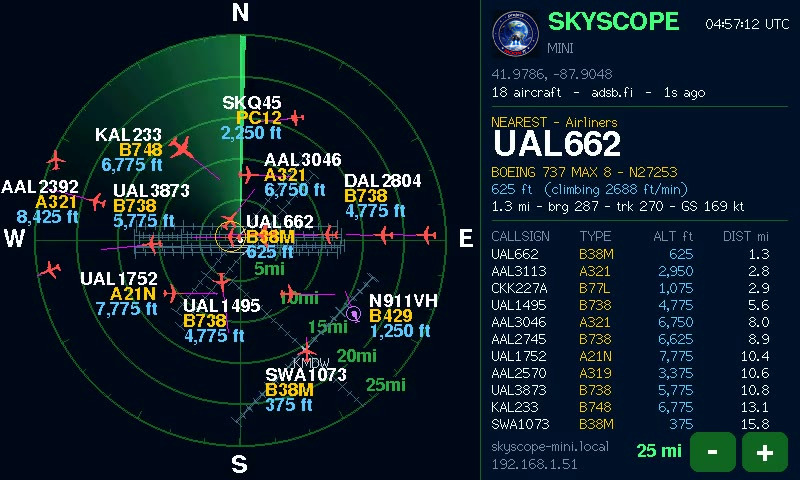
- The scope
Live aircraft on range rings with the sweeping beam, runways and extended centrelines at major airports.
- Nearest aircraft
The closest flight: type, registration, height, climb or descent, distance, bearing, track and speed. Tap any aircraft to pick it instead.
- The list
Every aircraft in range, nearest first.
- Range buttons
Touch − and + to zoom: 5–100 km, 2–50 mi or 2–40 nm.
- Its address
Open it on a phone or laptop for the settings page.
How it works
Every 5 seconds the Mini asks adsb.fi, over your Wi-Fi and the internet, for the aircraft around you, and draws them. A phone or laptop on the same Wi-Fi opens its settings page.
What it does
- Live aircraftUp to 150 aircraft from adsb.fi's open data, refreshed every 5 seconds and moved smoothly in between.
- Air traffic control lookSilhouettes or triangles coloured by kind, speed lines, tags that keep out of each other's way, and the sweep.
- RunwaysRunways and extended centrelines at major airports, so you can see the approaches line up.
- FiltersAirliners, business jets, light aircraft, helicopters, military and other; and altitude blocks counted from the ground, so it works over high country.
- EmergenciesAircraft squawking 7500, 7600 or 7700 flash and always show.
- TouchRange − and + on the screen; tap an aircraft to see its details.
What you need
- Display
Sunton ESP32-8048S043: an ESP32-S3 board with a 4.3″ 800×480 capacitive touch screen.
- Power
A USB-C data cable and any 5 V USB supply of 1 A or more.
- Wi-Fi
A 2.4 GHz network with internet access.
- Case (optional)
The 3D-printable radar-console case on the Satellite page fits the Mini too.
Set it up
- Download
Get the Mini firmware (one .bin file) from the Downloads page.
- Program it
Plug the board in, open Espressif's web flasher in Chrome or Edge, connect, and program the file at address 0x0. Nothing to install.
- Join its Wi-Fi
From a phone, join SkyScope-Mini-Setup. A page opens: choose your network and enter its password.
- Set your location
Open skyscope-mini.local (the address is on the screen), enter your latitude and longitude, and save. The sky around you appears.
Hold BOOT for 3 seconds at any time to set up Wi-Fi again. Board wired a little differently? Its Display hardware page sets the pins without rebuilding anything. The guide (PDF, on the Downloads page) covers every step and what to do if something doesn't work.
Mini or Satellite?
| SkyScope Mini | SkyScope Satellite | |
|---|---|---|
| Needs a computer | No | Yes: SkyScope on a Pi, Mac or PC |
| Aircraft from | adsb.fi over the internet | SkyScope (adsb.fi or your own receiver) |
| Updates | Every 5 seconds | Every second |
| Runways | Major airports | As SkyScope draws them |
| Airspace and routes | No | Yes |
| Filters and range | On the Mini (touch and its web page) | Set once on SkyScope; all Satellites follow |
| Best for | A radar on its own, anywhere with Wi-Fi | Extra screens for a SkyScope you already run |
Both run on the same board, so you can switch one to the other by programming the other firmware. More about the Satellite ›
Get the Mini
Free firmware with a step-by-step guide. Early release: it builds cleanly and its screen is checked with the same drawing code on a computer (the demo above), but it hasn't yet been run on the board itself. If something doesn't work, tell us.
Go to the download